
An MCP server is the connector that lets an AI assistant use a specific tool on your behalf, built on the Model Context Protocol that Anthropic introduced in November 2024. The best MCP server for designers is SVGator’s, because it hands back a finished, production-ready animated SVG from a prompt.
The 144 design servers listed at mcpservers.org on September 2026 each do one of three jobs. Figma, Mobbin and Storybook are read servers, which fetch from your existing work and change nothing. Canva, Webflow, Adobe and Penpot are write servers, which modify something inside a tool you already use. Author servers produce a deliverable that did not exist before: SVGator, Lottie Creator, Rive, SVG Genie and Blender.
SVGator MCP sits in the tier where the file coming back is the whole point, and it asks the least of you to get there: hosted at a URL with nothing to install, more than 20 tools, any MCP client, and free on every SVGator plan.
If you’ve skimmed a ten-tool list and still can’t tell which two to connect, the list below ranks SVGator first, explains why, and names what each server can’t do.
Table of contents
- What are the most useful MCP servers for designers?
- Why SVGator MCP is the best MCP server for designers
- What is an MCP server for designers?
- Are MCP servers just APIs?
- How do design MCP servers differ: read, write, or author?
- MCP servers that write into your design tools
- Other MCP servers that author animation, vector, and 3D work
- Do MCP servers run locally or remotely?
- How much does it cost to run an MCP server?
- Are MCP servers safe to use with client files?
- How to connect an MCP server to Claude or Cursor
- Do you need multiple MCP servers?
- Which MCP servers to connect by designer type
- Where to find design MCP servers beyond this list
- Which MCP server should you connect first?
Key takeaways
- An MCP server lets an AI assistant work inside a design tool on your behalf, and each one does one of three jobs: reading your existing work without changing it, editing files in a tool you already use, or authoring a brand-new file from a prompt.
- SVGator MCP turns a prompt into an animated SVG you can keep editing in SVGator, runs hosted with nothing to install, and is free to connect on every SVGator plan.
What are the most useful MCP servers for designers?
Fourteen servers cover the realistic options for design work as of September 2026. The table sorts them by what they do to your work, with SVGator MCP first.
| Server | What it needs | Cost | Catch |
|---|---|---|---|
| SVGator | Nothing to install | Free on every plan | None |
| Lottie Creator | Creator tab open | Creator plans | Needs Node.js 18+ |
| Rive | Rive editor open | Included with Rive | Early Access |
| SVG Genie | Nothing to install | Credit-based | None |
| Blender | Blender open | Free, open source | 3D, not web |
| Server | What it needs | Cost | Catch |
|---|---|---|---|
| Figma | Nothing to install | With a Figma plan | Catalog clients only |
| Mobbin | Nothing to install | Mobbin paid plans | Still in beta |
| Storybook | Storybook running | Free | Preview, API may change |
| Server | What it needs | Cost | Catch |
|---|---|---|---|
| Canva | Nothing to install | Core tools any plan | Pro for resizing |
| Webflow | Nothing to install | Free tier available | No animations |
| Adobe | Nothing to install | With Creative Cloud | None |
| Penpot | Plugin tab open | Free, open source | Self-hosted setup |
| LottieFiles | Nothing to install | LottieFiles plans | Does not author |
| Framer | API key | Free during beta | No MCP server |
Thirteen of those fourteen are built by the company or foundation whose tool they drive, so a first-party label no longer separates them. The label helped in early 2025, when most design servers were weekend projects, but it tells you nothing about whether a server can produce a file you can ship.
The SVGator row makes its case in four cells: hosted, any client, stable, and free on every plan. SVGator MCP is the only authoring server in the table that fills all four.
Why SVGator MCP is the best MCP server for designers
SVGator MCP is the best MCP server for designers because it authors a shippable animated SVG from a prompt, runs hosted with nothing to install, connects to any MCP client, and costs nothing on any SVGator plan.
What SVGator MCP can do to your work
SVGator MCP authors animated SVG from a prompt and returns a file you can ship. The server is hosted at mcp.svgator.com/mcp and talks to your assistant over Streamable HTTP, the current standard way a client and a remote server communicate. Sign-in runs through OAuth 2.1, and the server offers more than 20 tools.
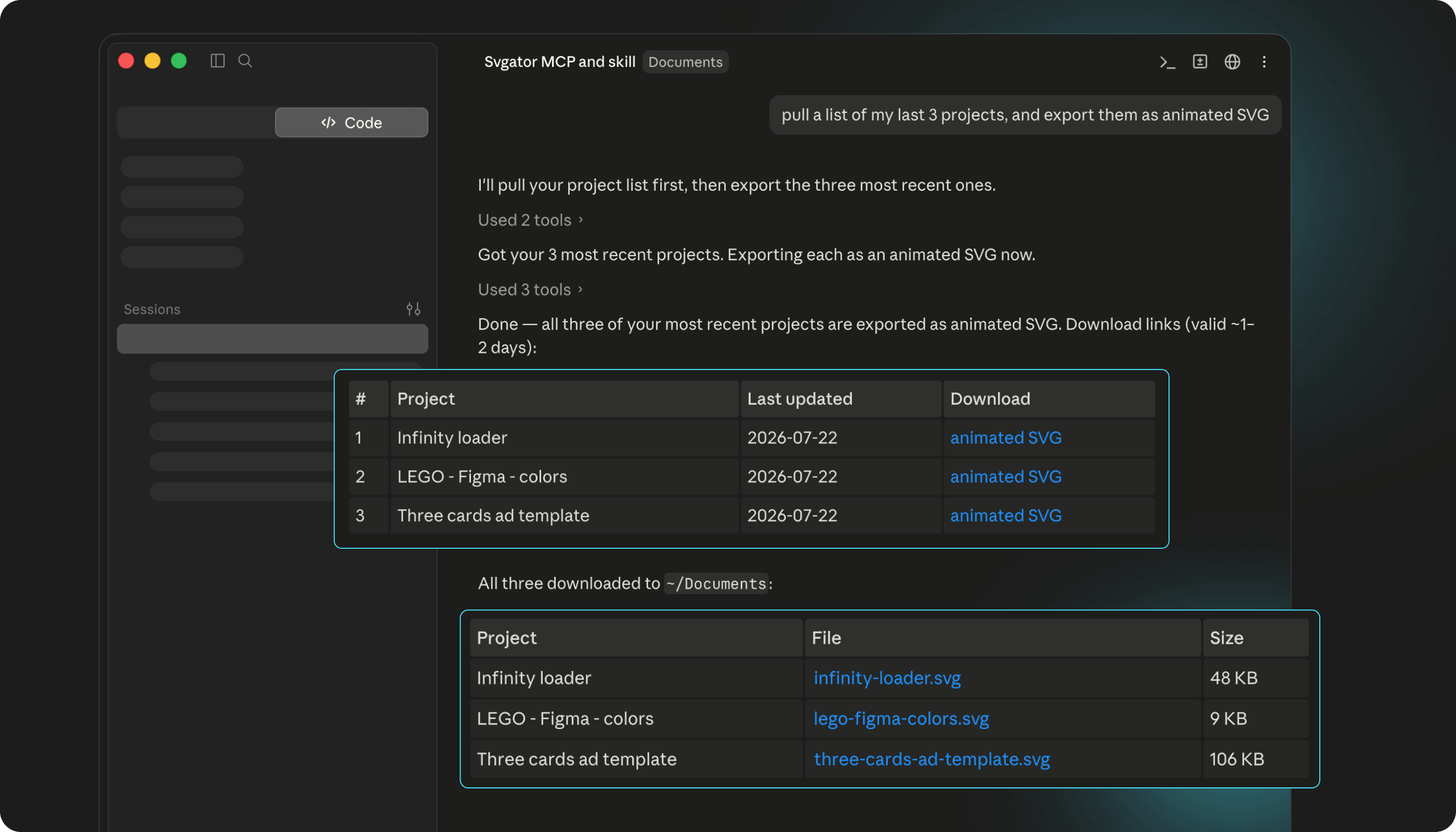
Edits go through one at a time. SVGator MCP validates each edit and rejects invalid changes, so a bad instruction fails without corrupting the project. Inspection is light on tokens, too: the get_skeleton tool returns project structure with keyframe counts and no values, which leaves the assistant’s context free for the actual work. A motion-design skill ships as built-in resources, and the assistant loads it only when you ask for it.
It works with any MCP client. Figma’s server, by comparison, only accepts clients listed in the Figma MCP Catalog.
Which formats SVGator MCP exports
SVGator MCP exports animated SVG in JavaScript or CSS as the primary output. It also exports Lottie, a JSON animation format that plays in apps and on the web, plus React Native, Flutter, video in MP4, MOV, AVI, MKV or WebM, and GIF, WebP, PNG sequence or ZIP.
The four web and mobile formats return immediately. Video and GIF render server-side with progress polling and a download link valid for roughly five minutes.
Every project the server returns carries an editor_url deep link, so you can open the work in the SVGator timeline and carry on by hand. Among the hosted animation servers in this list, SVGator’s is the only one that returns a link to reopen the project in its editor.
How SVGator MCP compares with other authoring servers
The authoring tier is ordered here by one criterion: hosted with nothing to install comes first, because a server you reach at a URL needs no desktop app running or browser tab left open.
Here’s where each of the other four authoring servers falls short on hosting, client support, stability or cost.
- Lottie Creator MCP needs Node.js 18+ and a Creator tab open, so it is not hosted.
- Rive MCP runs inside the Rive desktop editor and is still in Early Access, so it is neither hosted nor stable.
- SVG Genie MCP is hosted and stable, but it is credit-based rather than free on every plan.
- Blender MCP needs Blender running locally, and it authors 3D rather than 2D web animation.
What SVGator MCP cannot do
SVGator MCP authors standalone SVG animation. It does not read your design system, so design-system fidelity belongs to Figma’s server, pattern grounding to Mobbin’s, and brand-kit fidelity to Canva’s. It does not edit a live website, and it is not a 3D tool. Rive is stronger for state-driven interactive animation in apps. Video and GIF download links also expire after roughly five minutes, so save the file when the render finishes.
What SVGator MCP costs and how to connect
SVGator MCP is free on every SVGator plan, including the free tier.
To connect, add SVGator from Claude’s connector directory, or paste mcp.svgator.com/mcp as a custom connector. Claude Code and other MCP clients connect from the command line.
What is an MCP server for designers?
MCP stands for Model Context Protocol, a standard that lets an AI assistant carry out actions in a tool on your behalf. Anthropic engineers David Soria Parra and Justin Spahr-Summers introduced it on November 25, 2024.
The vocabulary is short:
- Client, sometimes called the host. The app you chat in, such as Claude or Cursor, which connects out to servers.
- Server. The connector a vendor runs for its own product, offering a fixed set of actions.
- Tool. One specific action a server offers, such as “export project”. When a listing says 22 tools or 4 tools, that is the unit being counted.
Without a server, an assistant can explain how to set a keyframe. With SVGator MCP connected, the assistant sets the keyframe itself. The assistant discovers which tools a server offers at the moment it connects, so the list stays current without you updating anything.
MCP is no longer Anthropic’s format. Anthropic donated the protocol to the Agentic AI Foundation in December 2025, a Linux Foundation directed fund co-founded with Block and OpenAI. Cross-vendor adoption came earlier still, with OpenAI in March 2025 and Google in April 2025. The Foundation ran the MCP Dev Summit North America in New York in April 2026, drawing roughly 1,200 attendees.
Are MCP servers just APIs?
Mostly they’re built on one. The server usually wraps the same API a developer could call directly.
MCP adds standardization on top of that wrapper. The client and server talk over JSON-RPC 2.0, a fixed message format, so every compliant client speaks to every compliant server. And you write the integration once for every compliant app.
Other approaches still win specific jobs. A native plugin makes more sense when the work stays inside one application and needs its UI. For scheduled, repeatable jobs with no conversation in them, a direct API script is simpler. Zapier and similar automation platforms fit when an event, not a person, starts the job. No designer strictly needs an MCP server. It becomes useful once you want an assistant to act inside your design tools.
How do design MCP servers differ: read, write, or author?
Design servers fall into three tiers, and the tier tells you what a server can change.
Read. The server fetches from your existing work or from a reference library, and nothing in your files changes. Figma, Mobbin and Storybook are read servers.
Write. The server modifies something you already have, inside a tool you already use, which is how Canva, Webflow, Adobe and Penpot work.
Author. The server produces a deliverable that didn’t exist before. SVGator, Lottie Creator, Rive, SVG Genie and Blender are authoring servers.
LottieFiles drew this line first, in its own documentation, where it states that its platform server manages animations rather than creating them.
Figma and Mobbin are both read servers and still not interchangeable, since one reads your system and the other reads everyone else’s. An authoring server like SVGator’s does a different job from either: it adds a new file to the project.
MCP servers that write into your design tools
Write servers raise the exposure because they modify work you already have, so scope and permissions matter in a way they did not for read-only servers. The safety section below covers what you are authorizing.
Webflow MCP. Webflow’s server reads and updates site structure and CMS content from a hosted endpoint, with a free tier available. It cannot create or edit interactions and animations, so the animated asset on the page has to come from somewhere else, such as an SVG file authored with SVGator. Write access to a live site is the highest-consequence permission in this tier. An assistant that can edit CMS content can also publish a wrong edit to the live site right away. You add Webflow’s hosted endpoint from your client’s connector list and authorize it through OAuth.
Framer. Framer has no official first-party MCP server as of September 2026. There is a third-party Marketplace plugin that requires Framer to be open on your machine, and its own Server API, in open beta since February 2026 and free during that beta with usage-based pricing signaled afterwards. Connecting means installing the Marketplace plugin inside Framer, or calling the Server API with an API key. The beta was still open on September 2026, so re-check before committing to it.
Adobe for Creativity connector. Adobe’s connector launched on April 28, 2026 as one of nine creative connectors, with roughly 50 tools across Creative Cloud, and guest users get around 40 of them without an account. An older community Illustrator MCP still works, but it is no longer the only route. It’s in your client’s connector directory, and signing in with an Adobe account unlocks the full tool set and higher limits.
Penpot MCP. Penpot’s server is open source, like Blender’s, and among the servers here it is the one built for a 2D design canvas you can self-host. It reads and writes Penpot files and costs nothing. It runs from your Penpot instance, including self-hosted ones, or locally through npx, and the Penpot MCP plugin has to stay open in a browser tab. It matters most to designers who won’t put client files into a hosted vendor tool. Point your client at your Penpot instance’s MCP endpoint, or add the local npx server as a command entry.
Other MCP servers that author animation, vector, and 3D work
Design roundups mostly skip the authoring tier, even though these are the servers that return a shippable file. The servers below each come with a different trade-off.
Lottie Creator MCP. It’s the closest alternative to SVGator MCP in this tier. It draws shapes and paths, sets keyframes and easing on position, rotation, scale, opacity and color, handles masks, mattes and blend modes, and exports Lottie, dotLottie (a compressed container that bundles a Lottie plus its assets), SVG and images. Setup is an npx install plus a command entry in your client’s config, and it needs Node.js 18+ and a Creator tab open with MCP enabled. That local requirement is the trade-off, and the reason it sits below SVGator’s server. Available on LottieFiles Creator plans.
LottieFiles platform MCP. Hosted at mcp.lottiefiles.com/mcp, with four tools reaching a library of over 100,000 free animations. It doesn’t author. Use it to find and organize animations. Connect it by pasting that endpoint into your client and signing in.
Rive MCP. Built into the Rive desktop editor on Mac and Windows, in Early Access since May 2025 and updated June 11, 2026. It drives the Rive editor to build View Models, State Machines (maps of an element’s states and what moves it between them), Layouts and Shapes. Rive is the strongest option in this tier for state-driven interactive animation. It needs the desktop editor open. There is nothing to connect: the server ships inside the editor session.
Blender MCP. Blender’s server drives Blender to create and modify scenes, objects and materials from a prompt. Blender Lab, the Blender Foundation’s experimental group, built the connector, and it shipped on April 28, 2026 alongside Adobe’s. Anthropic joined the Blender Development Fund as a corporate patron at €240,000 a year, and within a week the Foundation downgraded that membership to a single one-off donation after community objection. The connector itself was unaffected. It needs Blender running locally, is free, and installs from your client’s connector directory.
Do MCP servers run locally or remotely?
Remote servers are run by the vendor and reached over a URL, with nothing to install, and they are now the category default. Local servers run on your own machine, usually installed through npm, and something has to keep running for them to answer.
In practice, Lottie Creator, Rive, Blender, Penpot and the Framer Marketplace plugin all need an application or browser tab open while you work, as of September 2026. Hosted servers including SVGator, Canva, Webflow and Mobbin do not. If your assistant runs on your phone, or on a machine that is not the one with Blender installed, that difference decides what is usable.
Can you host or build your own MCP server?
Yes, both. Self-hosting makes sense for an open-source tool like Penpot or for internal systems that will never have a vendor server. Writing your own is a developer task, and most designers are better served connecting an existing server. The protocol documentation at modelcontextprotocol.io is the starting point if you want to try.
How much does it cost to run an MCP server?
The server itself usually costs little or nothing. “Free” carries four different meanings in this category, and they are not interchangeable:
- Free on every plan. SVGator, on every SVGator plan including the free one, with no beta or balance attached.
- Free during a beta. Figma’s write-to-canvas and Framer’s Server API, both with pricing signaled for afterwards.
- Free with a paid plan you already hold. Mobbin’s paid plans, and Canva’s core tools on any plan with features gated above it.
- Credit-based consumption. SVG Genie and Orshot, where usage draws down a balance.
toools.design is the only roundup that publishes cost for every server it lists, and it leaves out what the AI client itself costs.
Do MCP servers work with the free version of Claude?
Yes, with a few limits. Claude’s connector directory is available to users on every plan including Free, though individual connectors can still set their own account requirements, so check the connector’s own page. Adding a server by URL as a custom connector also works on Free, capped at one connector, and paid plans lift that cap. On Team and Enterprise an Owner has to add a connector before members can authenticate to it. Claude Code and other MCP clients connect from the command line with no plan requirement at all. The cost that does bite is the tool behind the server: a free connector into a product you pay for is still a paid workflow.
Are MCP servers safe to use with client files?
The server’s tool list is the ceiling on what you are authorizing. A read-only server can’t change anything no matter what it’s asked. A write server can, and the assistant decides when, which is the part to think through before you connect one to client work.
The auth model matters as much as the tool list. OAuth 2.1, the sign-in flow that authorizes access without handing over a password, keeps credentials server-side so the model never sees a token. SVGator MCP uses OAuth 2.1 and applies one validated edit at a time, so invalid changes are rejected. A local server configured with an API key sitting in a config file is a different exposure profile.
The best-documented protocol risk is prompt injection, where hidden text inside content the assistant reads issues it instructions. Invariant Labs demonstrated it alongside poisoned-tool data exfiltration in April 2025, and newer findings extend it. In April 2026 OX Security disclosed a systemic flaw in how MCP implementations handle the STDIO transport, estimating 200,000 vulnerable instances. Microsoft’s June 2026 guidance says to review changes to a tool’s description the way you would review a code change, and OWASP lists tool poisoning third in its MCP Top 10. The 2025 MCPTox benchmark, run against 45 live MCP servers, measured tool-poisoning success rates as high as 72.8%. Three habits reduce the risk:
- Connect fewer servers.
- Prefer read-only where read-only is enough.
- Review before approving any destructive step.
For client work, separate accounts and scoped access beat trusting a single connection to behave. LottieFiles and Magic Patterns both already market read-only paths.
How to connect an MCP server to Claude or Cursor
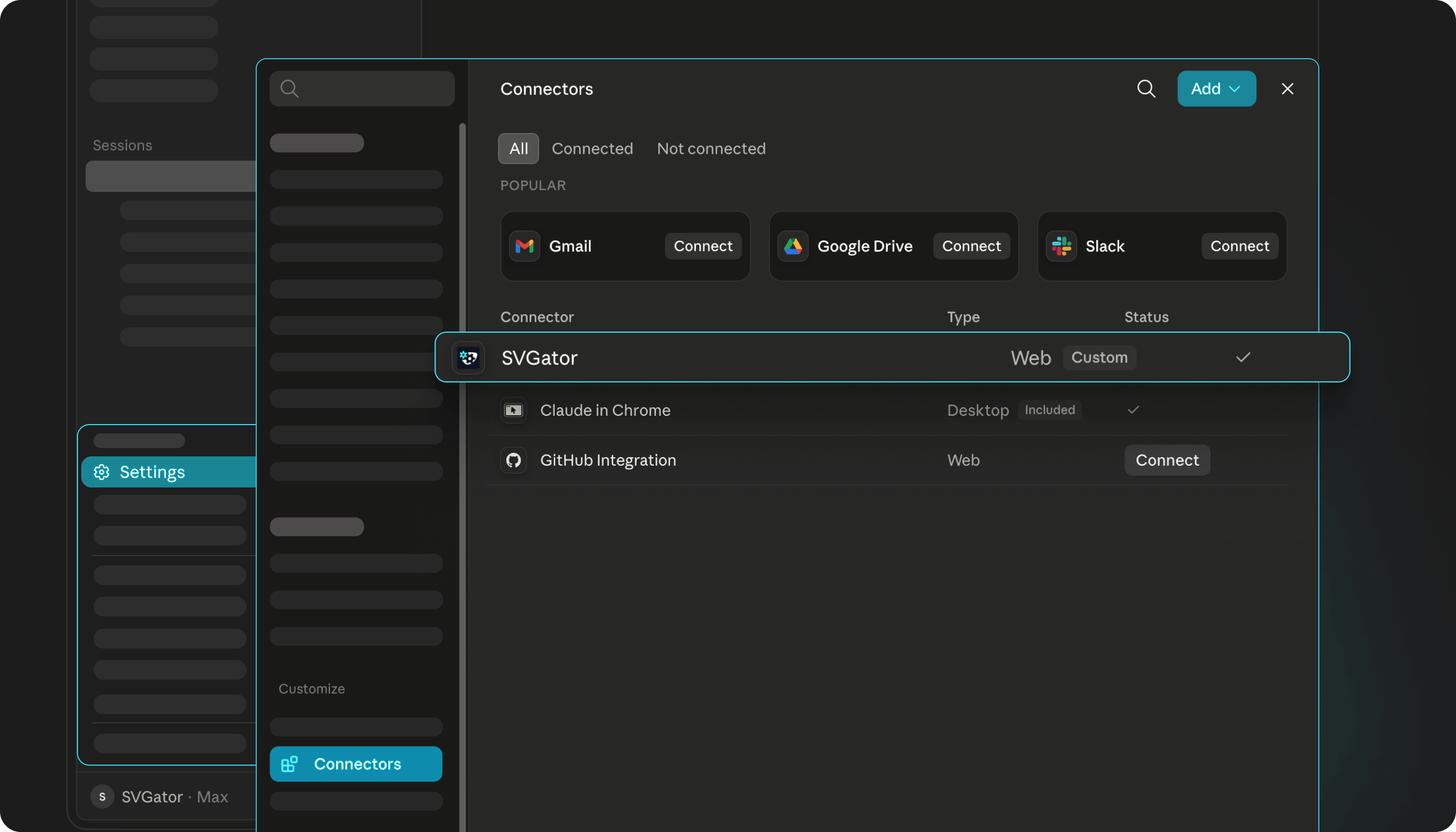
A remote server needs one URL and a sign-in, and the client talks to it over Streamable HTTP. In Claude, open Settings, then Connectors. If the server is in the directory, search for it and click Connect. If it is not, choose Add custom connector and paste the endpoint:
https://mcp.svgator.com/mcp
Claude opens the vendor’s OAuth screen, you approve, and the tools appear. The whole process takes four steps and touches no files on your machine.
A local server needs an install command and a config entry instead. The shape is the same across clients:
{
"mcpServers": {
"lottie-creator": {
"command": "npx",
"args": ["-y", "@lottiefiles/creator-mcp@latest"]
}
}
}
In Claude Code, add a remote server with one command:
claude mcp add --transport http svgator https://mcp.svgator.com/mcp
In Cursor: add servers on the Customize page or in an mcp.json file, and Cursor accepts both remote URLs and local command entries. For prompting technique once you are connected, see our guide to getting better results from the SVGator MCP server.
Do you need multiple MCP servers?
Two or three servers is the practical number for most designers, and ten is too many.
Every connected tool consumes part of the assistant’s limited working memory, so a long server list degrades the quality of the work the servers were meant to improve.
Token-light inspection is how a server keeps that context cost down. SVGator’s get_skeleton is one example, since checking what’s in a project that way costs a fraction of a full dump.
Which MCP servers to connect by designer type
Motion and vector designers: SVGator plus one reference server such as Mobbin. This is the group the authoring tier was built for, and the one where a read-only setup leaves the most on the table.
Product and UI designers: Figma plus Storybook, with SVGator added for microinteractions, loaders and onboarding motion. Add Mobbin if you reference other products often.
Brand and marketing designers: Canva plus Adobe for brand-consistent static output and deeper editing, with SVGator added once campaigns and landing pages need lightweight animated assets.
Freelancers handling client work: read-only servers first, scoped accounts always, and no write access to a live Webflow site until the workflow has proven itself on something of your own. SVGator MCP fits early because every file it builds is new, so a client’s existing work stays untouched.
Design teams: Figma plus Storybook plus SVGator as the authoring server, with the same three agreed across the team. Different server lists across a team produce inconsistent output.
Where to find design MCP servers beyond this list
mcpservers.org listed more than 150 design MCP servers in September 2026, up from 118 a month earlier.
Two categories were left out deliberately. Image-generation servers like Recraft and Scenario produce raster assets rather than editable files. Productivity servers like Notion, Miro, Linear and GitHub are useful to designers without being design tools. Community-built servers exist in volume, and star count is a weak proxy for whether anyone still maintains them: Snyk’s 14-server roundup went up in April 2025 and was never refreshed. Anthropic’s April 28, 2026 creative connector launch also covered SketchUp, Autodesk Fusion and Affinity by Canva, which fall outside this list.
Which MCP server should you connect first?
Start with SVGator MCP if your work ends in an animated file. Then add one read or write server for each tier you actually use, and keep the total at two or three.
Every capability, price and date here was verified in September 2026. At least five of these servers didn’t exist a year ago, so check anything you are about to build a workflow on.