AI can animate your logo, with one condition attached. Generative video models are good at atmosphere and bad at typography, so the letters in a wordmark are the first thing they break. The fix is to protect the exact mark, either by placing your original file on top of the generated clip or by picking a method that moves vector paths instead of redrawing pixels.
Table of contents
- What is AI logo animation and how does it work?
- What software can you use to animate your logo with AI?
- How to animate a logo in SVGator
- Step-by-step guide to animate your logo with AI
- Can ChatGPT, Claude, or Gemini animate my logo?
- What are the limitations of AI in logo animation?
- Can AI animate a logo with text without distorting the letters?
- Can I get a transparent background on an AI logo animation?
- How long should a logo animation be?
- Can I animate my logo for free?
- How long does it take to animate a logo with AI?
- Export formats for your animated logo by destination
- How do I add an animated logo to my website?
- Best practices for animating your logo with AI
- FAQ
- Conclusion
Key takeaways
- AI video generators repaint a logo pixel by pixel in every frame, which makes the letters in a wordmark drift, while vector-based AI animation moves the shapes inside the original SVG file and keeps every letter intact.
- A logo animation should run 2 to 5 seconds and end with the finished logo held still for at least half a second, so viewers see the exact mark before the motion stops or loops.
- Where the logo will appear decides the export format, with SVG for websites, MP4 for video intros and social media, GIF for email signatures, and WebM or MOV when the animation needs a transparent background.
What is AI logo animation and how does it work?
AI logo animation is the use of an AI model to add motion to a logo you already have. Two different mechanisms hide behind that one phrase, and the difference decides whether your letterforms survive.
The first mechanism is generative. An image-to-video model, meaning an AI model that takes a still image as its starting frame and generates a few seconds of video from a text description, treats your logo as frame one and paints new frames after it. What comes back is a video file, not a logo file, and that is why letterforms drift: a stroke that lands a fraction off in frame 30 reads as a different font. Kling, Runway, and Google Veo work this way.
The second mechanism moves paths. Vector-aware tools read the layers inside your SVG, short for Scalable Vector Graphics, and animate those shapes directly, a category Google's AI Mode already lists on its own. That difference is generators regenerate pixels every frame, while vector-aware tools move the paths of the original file. Vector files store shapes as math and scale cleanly; raster files such as PNG and MP4 store pixels and blur when scaled.
What software can you use to animate your logo with AI?
Five options can put motion on your logo: four you can do yourself, plus hiring someone. Scoring them on the same five criteria is the only fair way to compare a template preset with a freelance designer.
| Method | Letterforms | Editable after | Formats | Time |
| AI-assisted vector animation | Exact, paths move | Yes, full timeline | SVG, Lottie, GIF, MP4, WebM, React Native, Flutter | Seconds for a draft |
| Template makers | Safe, the logo is placed | Preset settings only | MP4, GIF | Minutes |
| AI video generators | Weakest, wordmarks drift | No, you regenerate | MP4, sometimes GIF | 15 minutes with retries |
- Template makers (Canva, Renderforest, Adobe Express). The fastest route to something watchable. The preset is also the ceiling.
- AI video generators (Kling, Runway, Google Veo, and products built on them such as Wireflow and Ozor). Where the cinematic work lives: particles, liquid, and light behave in ways a vector timeline cannot match. It pays for that in fidelity.
- AI-assisted vector animation (SVGator MCP). You describe the motion, an animation engine builds it on your paths, and the result opens as an editable project. It will never give you volumetric smoke.
How to animate a logo in SVGator
SVGator animates a logo two ways: you upload the SVG and animate it on a timeline, or you open one of the free logo animation templates and swap in your own artwork. Those templates are free for commercial use and land in your account as real starter projects, so the preset is a starting point rather than a lid. It is a vector animation editor, not a logo maker, so you bring the mark, and what comes out is a true SVG with editable keyframes.
Step-by-step guide to animate your logo with AI
Connect SVGator to your AI agent once, describe the motion, and export the file from the same chat.
Step 1: Prepare an SVG of your logo
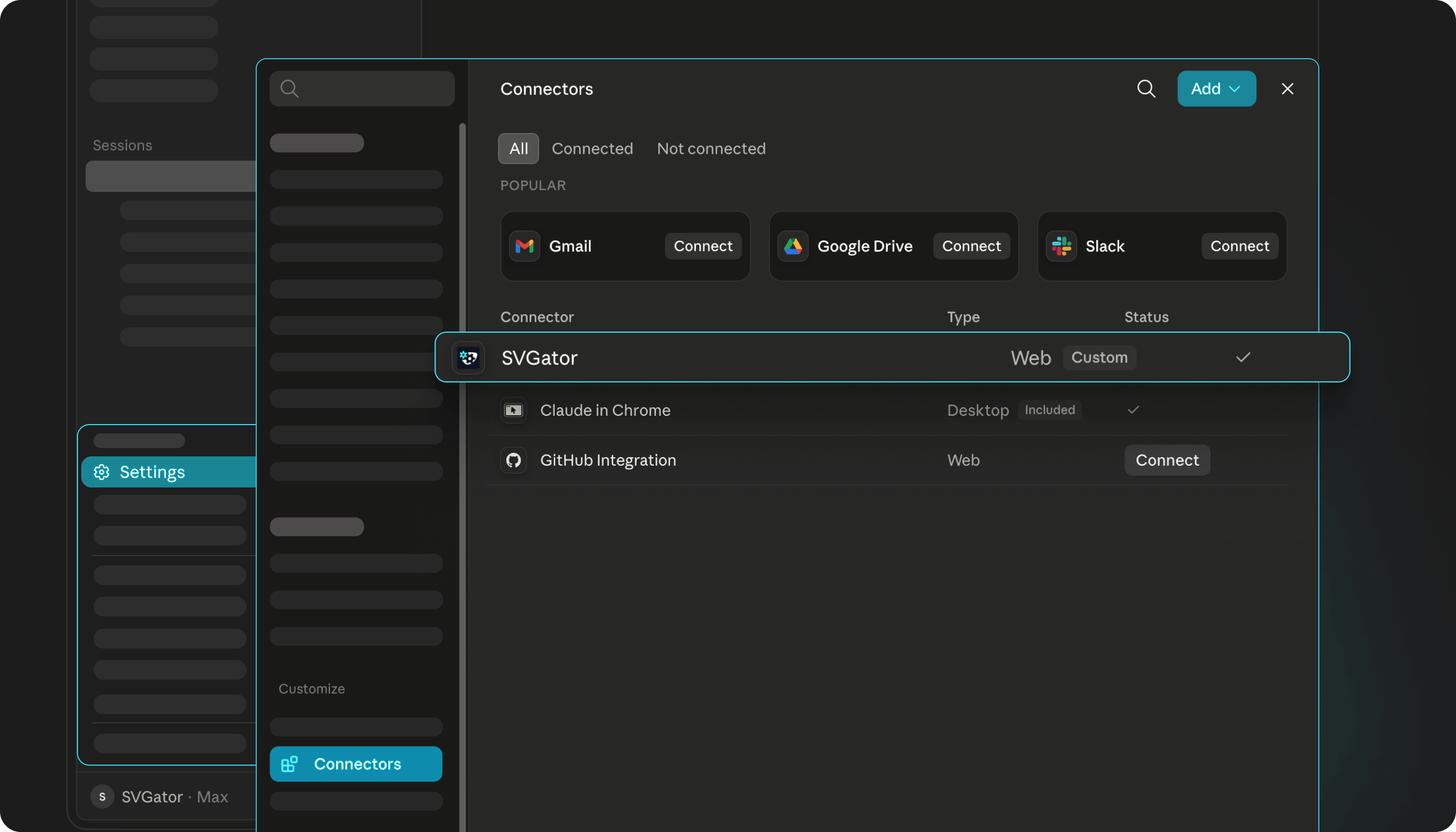
Add SVGator as a custom connector in your AI agent and sign in. The tools stay ready in every chat after that.
Then bring your logo in. Upload the SVG so it opens in SVGator as a project, where every element keeps its identity in the timeline. Name the layers while you are there, because the assistant works by name and not by position.
You can also prompt shapes into existence and skip the upload entirely. Starting from an asset already in the editor gives a better result every time though, because the assistant animates your drawing instead of inventing one. It is the first of several SVGator MCP best practices that decide how close the first version lands.
Step 2: Choose one motion style that fits your logo
The AI handles the technical setup. The feel is your call, so say it in the prompt.
Ask for professional and you get one clean reveal and a still hold. Ask for bouncy and elements overshoot, settle, and arrive one after another. Ask for calm and the timing slows down, the movements get smaller, and nothing lands hard. Pick one of the three and stop there.
Step 3a: Write a motion prompt for your logo animation
Say what should move and how, in plain language. No keyframes, no code. Name the MCP and its motion skills in the prompt so the assistant animates with direction instead of defaults.
You can also hand the decision over. Describe the brand, ask the MCP to use its motion skills to recommend a style, then tell it to build what it picked. A bakery gets a different answer than a law firm.
If the result is wrong, say so in the same chat. A revision costs a prompt, not a rebuild.
Step 3b: Use a logo animation template with the MCP
Open the templates page, go to the Logos tag, and pick a logo reveal. Then give your assistant the link and ask it to duplicate the project into your account, swap in your own logo, and leave the motion alone.
The timing comes from the template, so your prompts go on the artwork instead.
Step 4: Generate the animation and run the three frame checks
A real vector engine builds the animation, so the output stays clean. Every edit is validated, so a bad change gets rejected instead of applied.
Before you export, ask the MCP to run a quality check on the loop. Then check three things yourself: frame one matches the logo you brought in, the last frame matches it too, and the loop point hands back to the start without a jump.
Then ask for the format you need. SVG and Lottie come back instantly. GIF and video render in the cloud.
Step 5: Put your animated logo to work
Every project comes back with a direct editor link, so you can open it and fix the timing by hand.
Then put it where it will live. Ask your assistant to place the animated logo into real digital contexts, a web page, a login screen, an app, and to render each one as a separate MP4. Six or seven gives you enough to judge.
One more prompt resizes it for every channel and exports the whole set.
Can ChatGPT, Claude, or Gemini animate my logo?
Not on their own. Chat assistants produce text and images, and an animation is neither. What they can do is drive a tool that makes animations, and there are two ways to set that up.
The first is to use the assistant as a copywriter for a video generator. It writes and refines the motion prompt, you paste that into Kling or Runway, and the generator does the animating. Your logo still gets redrawn frame by frame, so the letters are still at risk.
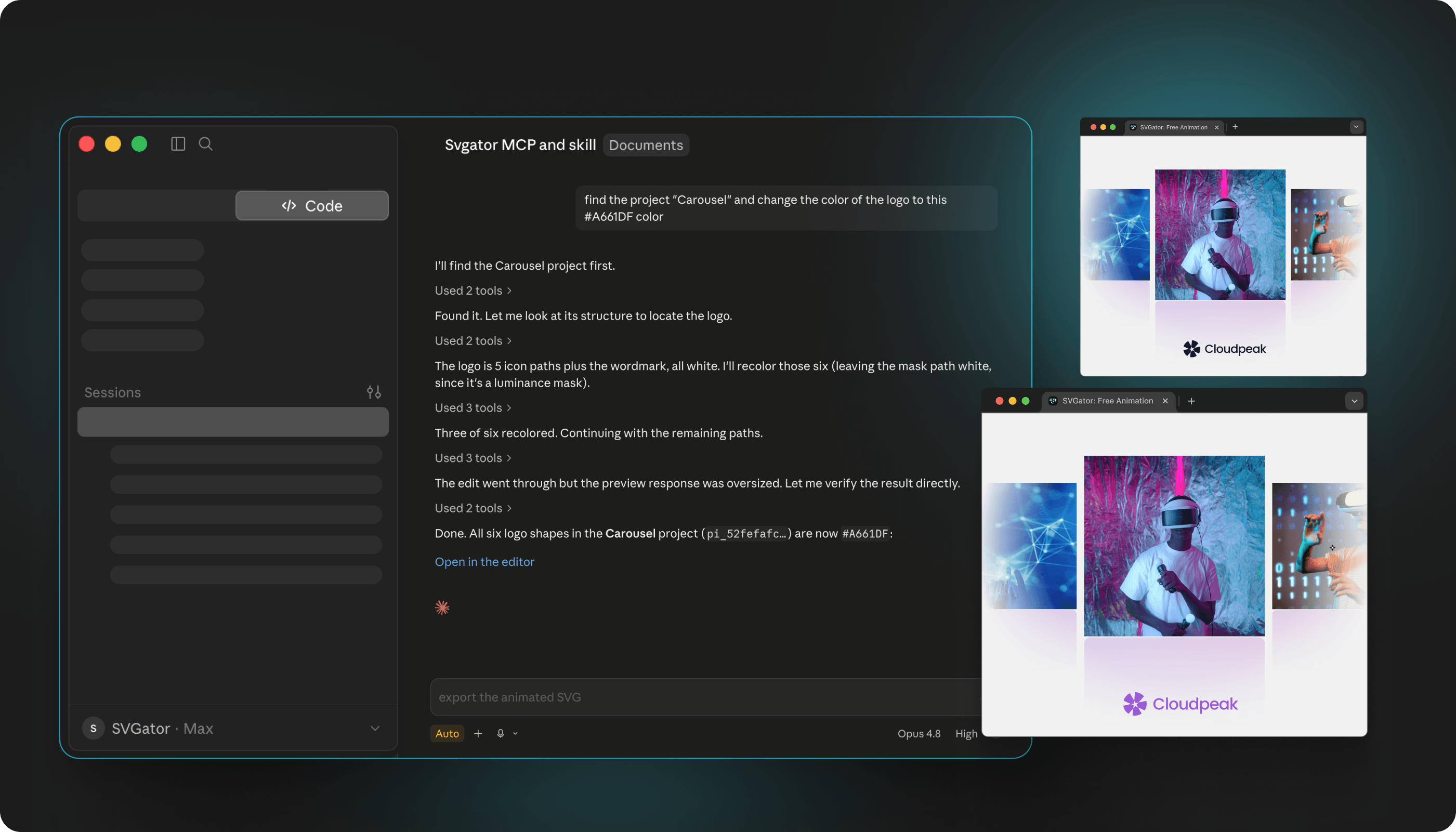
The second is to connect the assistant directly to an animation tool. Now it is not describing motion to another AI, it is working the tool for you, moving the paths inside your SVG instead of regenerating pixels. Nothing gets redrawn, so the letterforms stay exact and what comes back is an editable project, not a regenerated clip. That is what people mean by AI-assisted vector animation.
SVGator's MCP integration is the version you can try today. MCP, short for Model Context Protocol, is an open standard that lets an AI assistant operate another app on your behalf. It is free on any plan and runs with Claude, ChatGPT, Gemini, Grok, Perplexity, and more. Every project comes back with a direct editor link, so you can finish by hand. Export covers SVG, Lottie, React Native, Flutter, GIF, and video, with SVG and Lottie returning instantly and GIF and video rendering in the cloud.
What are the limitations of AI in logo animation?
Generative AI is good at atmosphere and bad at typography. The letters in your logo are the first thing to go, and every fix in this article is a way of protecting them.
An image-to-video model does not move your logo; it predicts what the next frame should probably look like and paints it, over and over. Small errors are invisible in smoke and fatal in letterforms, because a letter is a shape your eye knows by heart. Image-to-video research treats holding on to the reference image as an open problem and names identity drift and visual artifacts as documented failure modes, alongside flickering from weak temporal consistency.
The other limits are shorter. Most generators give no transparent output, and what you get back is raster, so it cannot scale or be edited later. Raising motion strength buys movement and costs likeness. Every extra generation step in a 3D pipeline multiplies the drift risk.
None of that applies to SVGator's MCP, because it never generates a frame. It moves the paths in your file, which is why the letters survive, the output scales to any size, and the project is still editable when the animation is done.
It has its own ceiling, though. It animates vectors, so a logo that only exists as a JPG has to be redrawn as a vector first. It will not give you photoreal smoke, fire, or volumetric light, because those are not shapes on a timeline. And which formats you can export depends on your SVGator plan.
Can AI animate a logo with text without distorting the letters?
Generative video on its own cannot guarantee it. Animate the icon with the generator and composite the original wordmark over the result, or skip the generator and use AI-assisted vector animation instead.
SVGator's MCP is that second route in practice. Your letters stay paths, the paths move, and nothing is ever repainted, so the last frame carries the same letterforms as the file you started with. On the generator side, a first frame and last frame lock, meaning a setting that forces the clip to start and end on your exact uploaded logo, helps, but it only protects the two ends of the clip.
Can I get a transparent background on an AI logo animation?
Usually not from a generator. A transparent PNG going in does not produce a transparent video coming out, because most image-to-video models render onto a solid background and export without an alpha channel, the layer of data that tells a video which pixels are see-through. Generate on flat green or black and key it out in an editor, or ask for MOV or WebM with alpha.
Through SVGator's MCP the question barely comes up. An SVG has no background unless you put one there, so it drops onto any color, photo, or dark mode without keying. Ask for WebM if you need a video file that keeps the transparency.
How long should a logo animation be?
A logo animation should run 2 to 5 seconds, 1 to 2 seconds for a sting and 4 to 8 seconds for a loop. The placement decides which end of that range you want.
| Placement | Duration | Loop? |
| Brand sting or bumper | 1 to 2 s | No |
| Video intro or outro | 2 to 3 s | No |
| Presentation opener | 2 to 3 s | No |
| Social profile video, Reels, TikTok | 3 to 5 s | Optional |
| Website header or ambient loop | 4 to 8 s | Yes |
Inside that runtime, four beats: intro, build, reveal, hold. The hold frame is the pause on the finished logo at the end, and it is the beat everyone skips and every viewer needs. End on the exact mark and let it rest for at least half a second. If the animation loops, land the loop point on that hold frame rather than mid-motion.
Can I animate my logo for free?
Yes, and there are at least three free routes. The catch is that "free" covers something different in each one:
- Free tier with a catch. Many template makers and generator wrappers give you a free export with a watermark or a resolution cap.
- Free credits that run out. Raw video models and most wrappers hand you a starting balance, then charge per generation.
- Free to build, plan-gated to export. SVGator's MCP integration costs nothing on any plan and the project stays editable for free. Which formats you can export follows your plan.
How long does it take to animate a logo with AI?
Minutes for a generated clip once you count retries: a three-second generation runs 40 to 90 seconds, and three to five attempts is normal. Seconds for a first draft through an assistant, plus a few minutes of adjustment in the editor.
Export formats for your animated logo by destination
The destination decides the format, so start from where the animation will live.
| Destination | Format | Notes |
| YouTube intro or outro | MP4, H.264, 1080p | Match the video's frame rate |
| Social profile video, Reels, TikTok | MP4 | Export 9:16 and 1:1 versions |
| Email signature, Slack, Discord | GIF, or APNG where supported | Keep it under 500 KB to 1 MB |
| Presentation opener | MP4 or GIF | GIF avoids playback settings |
| Video overlay | WebM or MOV with alpha | The only route to real transparency |
| Website header, loader, or app | SVG first, Lottie second | SVG needs no runtime library |
One export is rarely enough. Ship the full reveal, a one to two second sting, a silent version, light and dark variants, horizontal and vertical crops, and a static fallback frame. Keep them moving the same way, so the set reads as one motion identity instead of six unrelated clips. Then keep the editable master, the project file or the SVG source, which is what lets the animation survive a rebrand.
How do I add an animated logo to my website?
Export an animated SVG and keep it under a few dozen kilobytes. A typical animated SVG logo weighs a few KB where the same clip as MP4 runs to several MB, which is the whole argument for the vector route in a page header. If the logo is the reason you are here, the SVG logo animation maker page covers the setup in more detail.
Embedding gives you three options. Use inline SVG when you need CSS or JavaScript control, an img tag when it only has to play, and a video element only for generated clips.
Best practices for animating your logo with AI
- One motion idea per logo. Two ideas read as two logos.
- Compare frame one to the source file, so brand color and shape drift gets caught early.
- Keep GIFs under 1 MB and use SVG for anything on the web.
- Land the loop point on the hold frame so the loop does not jump.
- View the animation at avatar size before you publish, since that is where most people will see it first.
- Test muted and keep a silent version, since most placements autoplay without sound.
- Export the hold frame as a static PNG or SVG fallback.
- Keep the editable master alongside the finished file.
Frequently asked questions about animating a logo with AI
Is logo animation difficult?
Not with any of the methods above. Manual keyframing is the only lane with a real learning curve.
Is AI logo animation suitable for small businesses?
Yes. None of these methods needs a motion designer, a creative brief, or any motion design skill, so a small team can try one, judge it, and keep or drop it the same day.
Is 3D logo animation worth it?
For an icon-led mark in a video intro, sometimes. The AI pipeline runs three generations deep: a 3D render, a retexture, then a camera move from a video model, and each step multiplies the drift risk. The output is raster only, so you cannot edit it later and a rebrand means starting over.
For wordmarks and website use, faux 3D is the better trade: scaling an element to zero on the X axis at the midpoint of a flip, or animating artwork inside a clipping path, gives a convincing spin in a 2D vector tool, and the file stays small and editable.
Can I use an AI-generated logo animation commercially?
You need the rights to the mark itself, because animating a logo you did not design creates a derivative work, and the tool's terms have to allow commercial use of its output.
What are the benefits of AI logo animation?
Tie the benefit to the placement: a moving logo holds attention through a video intro and turns a static avatar into a profile video. Animation matching a brand's cues improves brand communication, while motion that contradicts them weakens recall.
How do I animate my existing logo without AI?
Import the SVG into an animation editor and keyframe it: position, scale, opacity, or stroke offset for a self-drawing effect, with easing on each segment. Export as SVG or video when it reads right.
Conclusion
Animating a logo used to mean learning a timeline or paying someone who already knew one. That part has changed, and SVGator's MCP is one of the reasons why: you describe the motion in a chat and get back a real project you can still open and adjust. What has not changed is the standard it gets judged against. The logo at the end has to be the logo you started with, and no amount of motion covers for letters that came back slightly wrong.