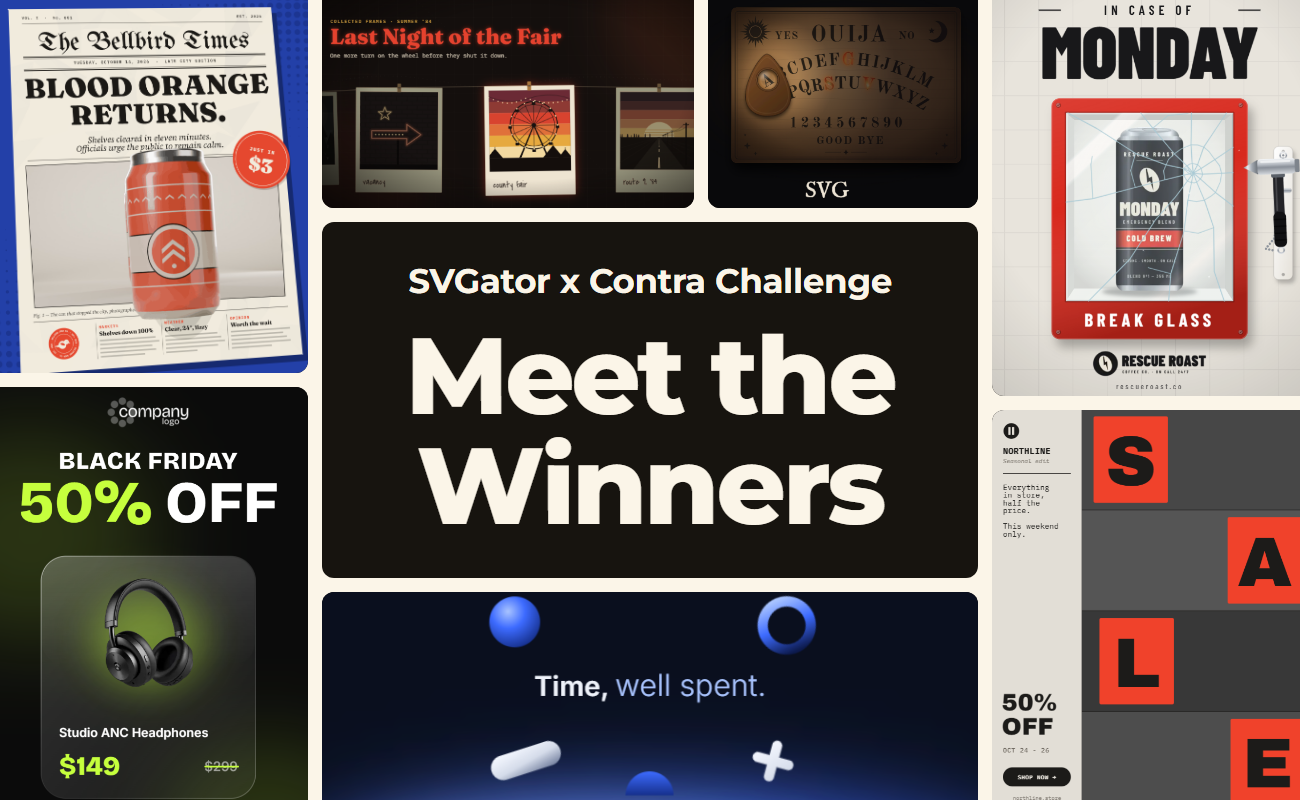
The SVGator x Contra animation challenge asked motion designers to build one animation template that anyone could rebrand and ship in minutes.
Below, you'll meet the five winners, see how each creator built their template, and find free animation templates from the strongest submissions, ready to customize for your own campaigns.
Table of contents
What was the SVGator x Contra challenge?
How were the SVGator challenge entries judged?
SVGator x Contra challenge winners
Special awards
Challenge entries now in the SVGator template gallery
How do you customize a challenge template in SVGator?
Final thoughts
What was the SVGator x Contra challenge?
The SVGator x Contra challenge was a contest for reusable animation templates in categories like ads, UI elements, loaders, logos, microinteractions, and animated assets. Every entry needed editable text, named elements, and replaceable images.
Creators could animate their own artwork, rework an existing template, or build with the SVGator MCP from an AI assistant, and everyone got a free month of SVGator Pro. Each submission included a public project link, a demo video, a short use-case description, and a social post tagging @SVGatorApp.
The total prize pool was $10,000:
- 1st place: $5,000
- 2nd place: $2,000
- 3rd place: $1,000
- Most engaged social post: $1,000
- Special award for best use of MCP: $1,000
All five winners also received a year of SVGator Pro.
How were the SVGator challenge entries judged?
The judges scored each entry on technique and on how well it used SVGator and the SVGator MCP to produce a template other people can adapt. Each entry could earn up to 30 points:
| Criterion | Points |
| Idea and design quality | 10 |
| Reusability | 10 |
| Craft and execution | 5 |
| Proof it can be changed | 5 |
For the proof points, creators showed the same animation with two sets of content: new images, new text, or swapped elements. Submission posts that reached 100 likes on X, Instagram, or LinkedIn earned bonus points.
SVGator x Contra challenge winners: 1st, 2nd and 3rd place
All three of the top templates were built with the SVGator MCP.
1st place: Kiel Cole
Kiel Cole took first place with Letter Strips, a 4:5 promo ad template for sales, launches, and grand openings. Retype the four sliding letter tiles, drop in eight photos and a logo, and the same file works for a fashion sale, a café opening, or a tech release.
2nd place: Artem Prokhorov
Artem Prokhorov placed second with Hourfield, a 16-second launch film for calendars, schedulers, and booking apps, where the week re-plans itself on screen before ending on the logo. Artem computed the motion in Python and wrote it into a live SVGator project as 780 editable keyframes.
3rd place: Anna Peredelskaia
Anna Peredelskaia placed third with an animated Black Friday ad carousel that slides product deals through glass cells. It works for holiday sales, ecommerce banners, and social ads.
Special awards: best use of the SVGator MCP and most engaged post
Best use of MCP: The Fantone
The Fantone won best use of MCP with BREAK GLASS, an 8-second ad template for problem-to-solution social ads, where a product waits behind glass that shatters.
Most engaged social post: Om Shukla
Om Shukla won the most engaged social post award with an animated product ad template that spins a newspaper onto the screen with your product on the front page. It works for launches, restocks, and press-style promos.
Challenge entries now in the SVGator animation template gallery
Strong entries joined the gallery whether they placed or not, each credited to its creator with a link to their portfolio. You can browse all of them in the SVGator animation template gallery, free for commercial use. Here are a few examples:
How do you customize a challenge template in SVGator?
Customizing a challenge template in SVGator takes four steps:
- Pick a template: open the animation templates page and choose the one that fits your campaign.
- Copy it to your account: the template is copied into your SVGator account as a project you can edit.
- Edit it by hand or with AI: retype the text, swap images and logos, and change colors in the editor, or ask whichever AI agent you work with to make the changes through the SVGator MCP.
- Export it: download the result as SVG, Lottie, GIF, or video, all from the same project.
Final thoughts
If the gallery is still missing the template you have in mind, SVGator gives you a browser-based editor for animating by hand, plus the SVGator MCP for generating and editing projects from your AI assistant.